Thursday, 28 April 2016

GET AIRTEL 3GB FOR #1000 ONLY

This plan doesn’t zap like the normal Airtel Blackberry plan. It charges you normal. This plan is supposed to work only on Blackberry devices but you can now use it on your Android devices. If you don’t know, Glo blackberry plan now zaps and I’ll prefer this plan compare to Glo blackberry plan. Those of you who are using Glo blackberry plan on your Android won’t find this tutorial difficult to understand because it’s not different from what you already know.

Why Should I Use This Plan?
>>Airtel Network is fast in most locations
>>It is cheaper than glo blackberry plan
>>It doesn’t zap like the normal Airtel Android plan
>>It is easy to activate.


Requirements
Blackberry 10 IMEI
Patience in tweaking the imei
Activate the plan
Tweak this Blackberry 10 IMEI 356760051192 randomly add any three digit to it.
==>Go to this site: http://imei-number.com/imei-validation-check/
==>Input the known 12 digits e.g 356760051192
==>Add 3 digits to the already known 12 digits making 15 digits e.g
356760051192549 and validate IMEI
==>If the random digit you choose is correct, it will display IMEI number is valid. But if the random digit is incorrect it will display IMEI number is not valid! And the valid IMEI will be displayed below it.
How Can I Add The IMEI to my Android Phone?
Follow the guide here if you don’t already know how to

How Can I Activate the plan?
>>Subscribe to Airtel Blackberry Plan 3GB for N1,000 by dialing *431#
>>Leave your phone apn to normal Airtel apn internet.ng.airtel.com
>>to check your data balance, dial *140#
For PC Users
Just activate the plan on your Android and use your Hotspot to connect to your PC.
With this in place, you don’t need to worry about Glo BIS again on your Android. If you are still confuse, kindly ask your question using the comment box.

The best trick to get many followers on twitter

Hi guys, How are you guys today.

Well today I will be tell you guys how to get ton of Twitter followers with out suffering.
For me I can say it's something that is working because I have personally tested it. And it's working.

OK let me tell you my experience. I created a new account not long ago. 2days old. So I used this method to get followers and in under that 3days I got more than 700 followers. And the reason why it's not upto 1000-5000 is because I did not concentrate on it.So how to go about it.


And you guys know what you can do with this much followers I don't need to even say it.

To start getting followers. It is really simple so follow this steps.

You just need to follow the following account.
@THEXDOGFATHER
@IMXGXWXVI
@XXXMXGXWXVXXX
@gfollowers7

Simply follow this account. First.

And to get followers you just need to reweet every tweet they make(compulsory) and follow anybody you see they(optional).

And I assure you that your followers will increase drastically. Thank you.

MTN FREE 100MB RENEW

MTN users here is another new free browsing for you, no any any VPN needed, no tweaking, is just a normal data given from MTN with just a single dialling. This one works on all devices [PC, ANDROID, iPad and others] no need of sing any third party apps to power your connection.


HOW TO ENJOY MTN NEW FREE BROWSING

1. Use any MTN sim card

2. Dial *460*6# (with zero credit)

3. You will receive a message telling you that your MTN Yello Life Plus service has been activated....


4. Then on your data and start browsing.

NOTE: Incase your browsing stops, Just go to your message and send BT to 131 and redial the *460*6# to continue browsing for free.

Saturday, 16 April 2016

Secret Tricks And How to Activate Developer Options for Android v4.2,4.3, and 4.4

ODIMEXY SAYS ; Very soon i will be preparing a post entailing huge list of codes for Google POWERED phones.
But, today we are going to share another hidden secret stuff for Google Android device users.

 Many of you might be aware
of " Developer Options " menu present in Android mobile
phones and tablets. "Developer Options" menu was put in
Settings page of Android OS to help developers in testing their
apps and other functionality and features of the OS.

In older versions of Android OS (from 2.0 to 4.1), the
"Developer Options" menu was directly visible to all users in
Settings page. But Google decided to hide the "Developer
Options" menu in Android 4.2 Jelly Bean version. The
decision to hide the menu was taken so that normal users can't
use this advanced menu as it may harm OS functionality and
may enable unwanted testing features.

Now in new Android OS versions such as Android 4.2, 4.3
and 4.4 , "Developer Options" menu is hidden by default but
can be enabled or activated using a secret trick. You can
consider it as an Easter egg .

So today in this topic, we are going to share the secret trick
to turn the hidden "Developer Options" menu on in
new versions of Google Android operating system. With the help
of this trick, you can enable "Developer Options" menu in both
mobile phones as well as tablets running on Android OS.

If you also can't see the "Developer Options" menu in your
Android mobile phone or tablet, just follow these simple steps to
activate and enable the menu:

⬛ You can Simply watch our video for better clearance and certification below  ⬛


STEP 1. First of all open Settings page of your Android
mobile phone or tablet.

STEP 2. Now you need to open "About Device " (or About
Phone / About Tablet) section. In old Android versions, this
section can be found at the bottom of Settings page. In newer
Android versions such as Android 4.4 KitKat, the "About
Device" section has been moved to a new tab "More " in
Settings page.
STEP 3. Once you open " About Device " section, scroll
down to bottom to see " Build Number" option.
STEP 4. To activate and add "Developer Options" menu, you
need to tap on the "Build Number" field 7 times .
Start tapping "Build Number" field and as soon as you tap the
field 3 times, Android OS will show a message that "You are
now 4 steps away from being a developer".
After tapping the "Build Number" field 7 times, you'll get a
message "Developer mode has been enabled " and the
"Developer Options" menu will be automatically activated and
enabled in Settings page.

STEP 5. Now you can enable or disable various advanced
option using "Developer Options" menu such as:


♦Stay awake (always turn the screen on while charging)Stats about running processes

♥Show CPU usage
♦USB debugging mode
♥Allow mock locations
♦Show visual feedback for touches
♥Show pointer location on screen
♦Flash screen to show updates
♥Disable or modify animations and transition effects to
improve performance
♦Force GPU rendering
♥Do not run activities in background when user closes them

◾And more depending on your phone's type.

⬛NOTE:⬛ This trick to enable "Developer Options" menu will
work in all mobile phone brands having Android OS such as
Samsung Galaxy, Sony, HTC, Google Nexus, LG,
Motorola, Micromax, etc.

Thursday, 7 April 2016

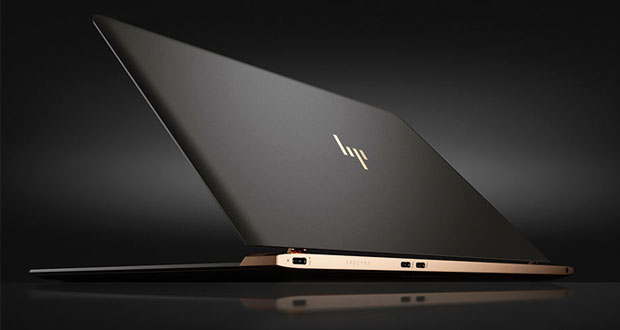
Video - Boom- Hp Unveils The World's Thinnest and Skinnest Laptop


Hp on Tuesday unveiled the latest challenger to Apple laptops at the International Luxury Conference in Versailles,
touting it as the thinnest laptop in the world.
At 10.4 mm, the HP Spectre's chassis is as thin as a triple-A
battery, the company noted.


The Spectre is powered by Intel Core i5 and i7 processors and
weighs in at 2.45 pounds. It has a 13.3-inch Gorilla glass
display, and stereo speakers from Bang & Olufsen.
It provides up to 9 1/2 hours of battery life, according to HP.
The new line "carries some of the thin design and high-end
finishing touches that HP introduced in its EliteBook Folio
earlier this year," said Charles King, principal analyst at
Pund-IT .


HP "is hoping that surpassing Apple in terms of thinness will
spark notebook sales," he told TechNewsWorld.
Thin Isn't Enough
That said, thinness "is simply one aspect driving product
innovation and user satisfaction," King pointed out.
HP "also needs to develop an Apple-like cachet around its
products as being must-haves for consumers," he said.


Competitors, including Dell with the XPS 13 and Lenovo with
its Yoga line, "have succeeded in such efforts over the past
couple of years, which is to say that Apple isn't the only vendor
HP needs to worry about."
Dell's XPS 13 "has been particularly effective in matching or
surpassing features in the 12-inch MacBook," observed King.
Dell "understands that thinness is just one aspect of laptop
innovation and value, and has consistently delivered XPS 13
solutions with excellent or superior compute performance, energy
efficiency and graphics."

Add in touchscreen capabilities -- "something Apple has
resolutely avoided, though current rumors suggest a touch-
enabled MacBook may be coming later this year -- and Dell's
SPX 13 is arguably equal or superior to a similarly sized
MacBook," he said.
Why Apple Rules Them All
Outstanding features may not be enough to knock Apple off its
notebook throne.


"Apple's greatest advantage is their vertical integration," noted
Linn Huang, a research director at IDC.
Competitors increasingly are copying Apple's design, and
consumers "are thinking less about design today than they did
two to three years ago, because the usage model has moved to
the browser," he told TechNewsWorld.


"The more our consumer services transition to the cloud, the
more the usage model gets stuck in the browser," Huang said, so
"I'd expect that there'd be more homogeneity among products.
Ultimately, if you're only using the browser at home, it doesn't
really make too much of a difference whether you're using OS
X or Chrome or Windows."


That being the case, Apple "has the lead, because OS X plays
very nicely with iOS -- much better than iOS does with
Windows or Chrome," he added.
Apple also offers a multiplicity of devices in the ultralight
notebook class.


"We classify all Apple's MacBooks, including MacBook Pros,
as ultraslim devices," Huang said. "While XPS and HP's
product will gain a lot of ground, Apple will still be king in the
thin and light segment, at least in the United States."

Monday, 4 April 2016

VIDEO - The 4-inch iPhone SE Survives Waterproof Test just like iPhone 6s

Apple has never mentioned that any of its
devices is waterproof but this hasn’t
stopped people from trying to see if these
devices would survive being submerged in
water. During the iPhone SE launch,
Apple didn’t mention the waterproof
capability of the phone as well. YouTuber
Zach Straley carried out a waterproof test
on the device and surprisingly, it did
survive.

In an uploaded video, the test was carried
out on three Apple devices: the iPhone 5s,
the iPhone 6s and the new iPhone SE. The
iPhone 5s gave way around the 5 minutes
mark with signs of water damage on the
screen. The iPhone SE and the iPhone 6s
continued to work. Sound tests and
camera tests were carried out at intervals

and everything looked fine.
The devices survived an hour-long water
submersion. It should be noted that the
iPhone 6s and the iPhone SE were not
marketed as waterproof. This video
should in no way serve as a guarantee
that the devices are fully waterproof.
However, the devices should be able to
take a splash and still work fine.

You can watch the video below:


Latest Gionee W909 Premium Flip Phone With Dual Display. Boooom

 Gionee want  to prove to you that Flip phones aren’t dead yet. The latest Gionee W909 phone
is a flip phone, it has high-end specifications
and runs Android 5.1 Lollipop behind Amigo OSTEENA


First revealed through TENAA, China’s version
of the Federal Communications Commission,
the W909 features two 4.2-inch displays on
the front and back of the phone, with both
offering a 1,280 x 720 resolution. A 16-
megapixel camera sits above the fingerprint
sensor, which is quickly becoming a common
feature in modern smartphones but is
incredibly rare for a flip phone. Meanwhile, a
5MP shooter sits above the interior display,
though it probably would have made more
sense to have it sit above the exterior display.
Gionee W909 has a 4GB RAM and it’s powered
by Helio P10 chipset with an octa-core
processor. There’s an internal storage of 64GB
and this can even be expanded through a
microSD card slot.
The device comes with USB Type-C connector
and a battery capacity of 2530mAh.

Finally, the W909 is stuck with Android 5.1
Lollipop, with Gionee’s custom Amigo UI
layered on top. It comes with a price tag of
$615.
What is your take on this?